Forcing web traffic to Umbrella proxy tunnel using policy based routing on Cisco ASA
Network requirement: Stringent control over web traffic, even over clients that are not using the Umbrella roaming security client. Force internal to external web traffic to use the proxy. Exert absolute dominance over your office users!
Scratch that last bit, but it DOES feel good, doesn’t it? Let’s get to cracking.
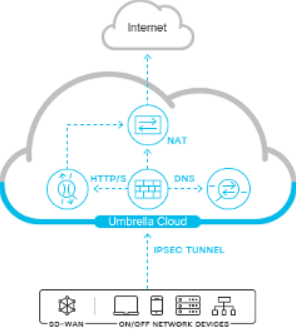
Configuring the Umbrella tunnel ‘A side’
This guide assumes you have already set up the Umbrella side of the tunnel using the below guide. It is a very simple procedure even without the guide so I’m not going to repeat it here. Your public IP must be configured so that they know to expect the incoming connection. You must also set your tunnel key which must be matched in the config below.
https://docs.umbrella.com/umbrella-user-guide/docs/add-a-tunnel-cisco-asa
ASA configuration ‘B side’
Create your ikev2 policy. Enable it on your outside interface if you haven’t already.
crypto ikev2 policy 50
encryption aes-gcm-256
integrity null
group 19
lifetime seconds 86400
crypto ikev2 enable outside
Configure the group policy and tunnel group, replacing 146.112.82.8 with the IP address of the nearest Umbrella datacenter to you. Ensure that the key you use in the config matches what you’ve configured on the Umbrella portal end.
group-policy umbrella-policy internal
group-policy umbrella-policy attributes
vpn-tunnel-protocol ikev2
!
tunnel-group 146.112.82.8 type ipsec-l2l
tunnel-group 146.112.82.8 general-attributes
default-group-policy umbrella-policy
tunnel-group 146.112.82.8 ipsec-attributes
ikev2 remote-authentication pre-shared-key 0 typeYourk3yHere
ikev2 local-authentication pre-shared-key 0 typeYourk3yHere
Configure IPSEC
crypto ipsec ikev2 ipsec-proposal umbrella-ipsec-proposal
protocol esp encryption aes-gcm-256
protocol esp integrity null
Create an IPSEC profile for Umbrella
crypto ipsec profile umbrella
set ikev2 ipsec-proposal umbrella-ipsec-proposal
Create a VTI with an un-routed IP address range. Later our policy based routing will set 1.1.1.2 as the next hop, thereby utilizing the tunnel and sending the traffic to Umbrella.
interface Tunnel1
nameif vti
ip address 1.1.1.1 255.255.255.0
tunnel source interface outside
tunnel destination 146.112.82.8
tunnel mode ipsec ipv4
tunnel protection ipsec profile umbrella
Here we will define the interesting traffic that will traverse the tunnel. It is suggested to remove DNS. Sending DNS through Umbrella will result in it being proxied and NATed in such a way that it will break your policy control. The Umbrella cloud expects your static public IP address as the sender of your DNS requests, so it’s best to exclude this traffic. In a real world example you would also want to exclude your inside networks or RFC1918 address destinations from being proxied.
access-list pbr-umbrella remark Excludes DNS over TCP
access-list pbr-umbrella extended deny tcp any any4 eq domain
access-list pbr-umbrella remark Excludes DNS over UDP
access-list pbr-umbrella extended deny udp any any4 eq domain
access-list pbr-umbrella remark (last rule, catch all web traffic not already excluded with a deny)
access-list pbr-umbrella extended permit object-group HTTP-HTTPS any4 any4
Enable the policy based routing to match traffic using the above pbr-umbrella ACL and forward it to the next hop 1.1.1.2, which then gets sent to the real IP across the tunnel to Umbrella.
route-map umbrella-pbr permit 10
match ip address pbr-umbrella
set ip next-hop 1.1.1.2
!
interface GigabitEthernet0/0
policy-route route-map umbrella-pbr
If you also have an ACL applied to your inside interface you may need to allow this web traffic as well as it will still be subject to its rules.
access-list in_to_out line 1 remark Bypass for Web ports
access-list in_to_out line 2 extended permit object-group HTTP-HTTPS any4 any4
You can verify the tunnel and routing using the below verification commands.
Verification:
show crypto ikev2 sa detail
show crypto ipsec sa detail
packet-tracer input inside tcp 192.168.1.26 3520 104.16.250.6 443 detailed